

Key Takeaways
- Tool sprawl slows delivery when engineers switch between applications and search for reliable technical information.
- Disconnected pipelines delay security feedback, while fragile integrations consume engineering time and create rework.
- Scattered access and monitoring tools slow onboarding and make production incidents harder to resolve.
- Unmanaged subscriptions increase security exposure and duplicate spending across engineering teams.
- Tool audits and an internal developer platform can simplify workflows and make delivery improvements measurable.
Every quarter, enterprises expect engineering teams to improve shipping speeds, scale reliably, and eliminate bottlenecks. For that, managers routinely introduce solutions like new project trackers, system security scanners, collaborative workspaces, etc. They are supposed to keep distributed teams aligned and focused on meeting deadlines and maintaining code quality, and at a glance, these steps make sense.
Yet, at the end of each quarter, engineering teams end up in fragmented tool sprawl. A mess of disconnected tools slows engineering output and prevents teams from meeting client expectations, ultimately leading to revenue loss. Tool sprawl alone costs companies $1 million per year in lost ROI, since 75% of devs lose up to 15 hours per week while dealing with 7.4 disconnected tools to build applications.
More importantly, tool sprawl degrades the developer experience. Continuous context switching, investments in integration maintenance, and delayed feedback loops trap engineers with the same code for days. A report says 88% of developers blame disconnected toolsets for decreased productivity, with 44% claiming high loss of focus due to context switching.
So, when senior engineers and developer teams spend more time navigating tools and managing tool integration than writing and shipping code, delivery speed and release cycles slow down. To mitigate this, enterprises need to first identify how these accumulated tools, designed to accelerate productivity, are ultimately hurting engineering productivity.
The 7 Silent Killers of Engineering Productivity
As engineering organizations grow, individual teams start working with new software to solve immediate problems and edge cases. But without a cohesive strategy, the tech stack becomes fragmented, with individual tools working in isolated operational silos. Delivery pipelines slow down, and administrative work piles up. As a result, engineering teams find less time to actually deliver code or innovate and improve working pipelines.
To understand how tool sprawl affects enterprises, take a look at these 7 factors that kill developer productivity:
1. Excessive Context Switching & Cognitive Load
Excessive context switching increases cognitive load because developers must rebuild their understanding of a task each time they switch tools.
For example, an engineer investigating a bug might begin with a Jira ticket, then check Slack for missing details. GitHub shows recent code changes, while Datadog logs and PagerDuty alerts show how the service behaved. Confluence may hold the runbook, which the engineer must check against the current deployment.
The engineer needs to connect all working tools before identifying what failed and how to fix it. The missing links create extra work throughout the investigation, including:
- Tracing the failure: Requires matching the ticket, code change, deployment, alert, and logs.
- Checking the runbook: Requires confirming its instructions still apply to the service and its current setup.
- Returning after an alert: Requires recalling the original task’s system state, dependencies, and unresolved questions.
Debugging engineers keep the system state, dependencies, and recent changes in mind simultaneously. Repeated switches make that harder and leave less free time for diagnosis, code review, and feature work.
2. Fragmented Knowledge Repositories and Documentation Silos
Fragmented documentation slows development when teams cannot identify records related to the current design, API contract, or recovery procedure.
It is important for an engineer changing a service to determine which records correspond to the software version running in production. Two API documents may specify different responses, while an architecture diagram erases a newer downstream dependency. In that case, before changing code, the engineer should inspect the implementation and identify the correct record.
New hires must repeat the verification process without the experience to recognize outdated guidance. Plus, when experienced developers leave, teams may have to review code and old discussions to understand undocumented design decisions, taking up more time and leaving less bandwidth for maintenance and feature work.
Why Application Lifecycle Management Is Now a C-Suite Priority
Learn how Application Lifecycle Management (ALM) enables governed software delivery, AI readiness, technology risk management, and business value
3. Broken Feedback Loops in Disconnected CI/CD and Security Toolchains
A disconnected CI/CD and security toolchain can delay feedback when scan results are not aligned with the pull request and build. A team might use separate tools for static code analysis, secret scanning, vulnerability checks, and storing build packages. When reports are kept in different places, developers need to manually work out which code version is relevant to which feedback.
The rework and validation effort increases when a finding is detected later in the release process:
- During review, developers can fix a problem while the code and its test results are still fresh.
- After merge, they must find the affected commit, confirm the issue, and repeat testing to validate the fix
- Near release, teams need to rerun scans, rebuild the package, repeat validation, and confirm that earlier approvals still apply.
Separate storage adds another check when teams cannot easily match a release package to its source code and scan results. Security teams then need to confirm that the package awaiting deployment is the version that passed the required checks. Manual verification can delay the release and take engineers away from planned work.
4. Integration Tax and Maintenance Overhead
When enterprises purchase unsynchronized tools, engineers need to custom code integration layers for the tools to communicate and work together. Plus, even after the setup, webhooks and API wrappers still need owners to monitor failures, manage access, and check data accuracy.
Meanwhile, GitHub ticket updates, telemetry feeds, and changes to connected systems create different kinds of maintenance work:
| Connection | Work the platform team must do | Effect on delivery |
| GitHub and project tracker | Engineers match code events to ticket IDs, retry failed updates, and handle duplicate events. | Missed updates leave ticket status unclear, so teams must verify progress before planning further work. |
| Monitoring tools | Engineers map telemetry fields, maintain API access, and check that service events reach the intended dashboard. | Missing events leave gaps in an incident timeline and can slow the search for the cause. |
| Changing APIs | Teams repair connectors after endpoint, authentication, or data format changes, then check for records missed during the failure. | Senior engineers spend time restoring internal connections while planned product and architecture work waits. |
5. Onboarding Friction and Ramp-Up Delays
Developer onboarding slows down when a new engineer needs access to several tools before they can run and test the application. GitHub or GitLab access may come first, followed by permissions for the staging database and build system. Each request can go to a different approver, so the engineer cannot complete the setup in one step. Plus, once access arrives, missing environment variables or dependencies may still prevent a local build.
A senior engineer needs to check the configuration, fix credentials, and investigate build errors. The support work takes time from code reviews and product delivery while the new hire waits to test a first change. Until the setup is working, the new engineer also loses the opportunity to learn the application through hands-on work. When these problems keep repeating with each hire, new engineers take longer to handle tickets independently.
6. Fragmented Observability and Finger-Pointing Incidents
Fragmented observability slows down incident response when teams cannot connect metrics, logs, and traces across the services involved. One team can see healthy system metrics, another sees error logs, and a third sees partial traces, with no correlation in between.
To locate the fault, engineers must trace the failed request across separate tools and establish when errors began. They can then:
- Match request IDs and timestamps across tools to see which service handled the request.
- CompCompare alerts from different systems to separate one shared failure from unrelated symptoms.
- Follow the request into downstream services to find errors that a healthy upstream dashboard cannot show.
- Check recent deployments and configuration changes against the first errors to identify a possible trigger.
- Ask other teams for logs or traces when access limits block checks of a suspected service.
- Use the combined evidence to identify the failing component and the team that can test a fix.
7. Shadow IT and Rogue Subscriptions
When approved tools take too long to obtain, an engineering team may buy its own monitoring service, tracker, or code repository. A corporate card lets the team start immediately, and the new account soon holds alerts, tickets, or code. But as more work depends on that account, removing it becomes harder, even though platform and security teams may never have reviewed it.
Because security was not involved, review teams cannot know whether the account holds source code, service logs, or credentials. The account can also miss the access, data retention, and audit logging checks applied to approved tools. If other squads make similar purchases, the company pays for overlapping services while engineering records spread across separate accounts.
When finance identifies the overlap, canceling a contract may disrupt the dashboards, tickets, or repositories used in daily work. Engineers need to move those records, preserve access and links, and test the replacement before closing the old account. The unplanned move takes time away from delivery, while security must verify which data and permissions remain in the old service.
From Tool Chaos to an Internal Developer Platform (IDP)
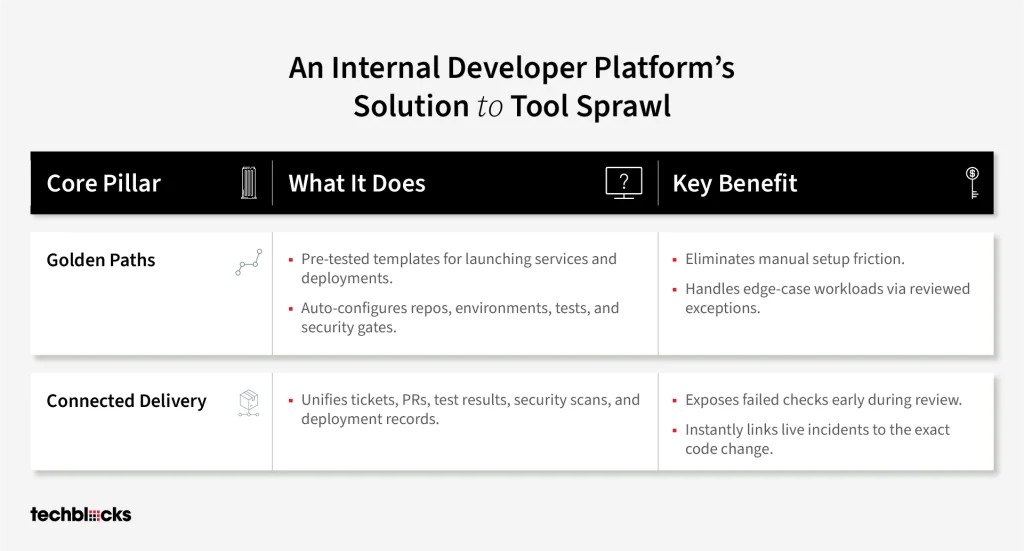
An internal developer platform (IDP) gives engineering teams shared ways to build, test, release, and operate software. A platform team maintains those workflows and connects the approved tools, access rules, and environments behind them. Developers can start common tasks without rebuilding integrations or requesting every resource separately.
New services need consistent settings before development begins, while existing services need a clear record of each change. The platform addresses both needs through golden paths and a connected workflow from ticket to deployment:
- Golden paths provide tested templates for common tasks, such as starting a service or deploying a change:
- A template can configure the repository, environment, automated tests, and security checks.
- Teams with unusual workloads can use a reviewed exception that keeps access and ownership clear.
- A template can configure the repository, environment, automated tests, and security checks.
- A connected delivery workflow links tickets to pull requests, test results, security findings, build packages, and deployment records:
- Developers receive failed checks during review, and release teams can identify which tested package entered production.
- The same links help engineers connect an incident to the code change behind it.
- Developers receive failed checks during review, and release teams can identify which tested package entered production.
Embedded engineering pods work with product teams to put golden paths and connected delivery workflows into daily use. Platform, application, security, and operations specialists review subscriptions, fragile integrations, and access delays across existing projects. Together, they decide which tools support the shared workflow and which duplicate functions already covered. Before retiring a subscription, they move active records and permissions, then test the replacement with its users, and teams can track setup time, release lead time, maintenance effort, and licenses retired after the move.
Tool Consolidation Checklist for Enterprises
Enterprises need evidence that consolidation will reduce manual effort and delivery friction across the engineering workflow.
The review should establish current costs and performance before approving a platform investment or canceling contracts.
Billing records, developer workflows, and pipeline results can answer four practical questions:
| Question for engineering teams | Evidence to collect |
| Which developer tools support active work, and which subscriptions duplicate an approved service? | Record tool owners, actual use, integrations, contract costs, and renewal dates before recommending cancellation. |
| Can engineers create a compliant staging environment through one approved workflow? | Measure setup time and count the access requests, approvals, and manual configuration steps required today. |
| Do automated tests and security checks return findings while developers still have a pull request open? | Check that findings link to the affected commit and that release packages retain test and scan records. |
| Can engineering, procurement, and finance see the full cost and expected benefit of consolidation? | Include migration costs, ongoing platform support, and baselines for setup time, release lead time, and maintenance hours. |
Enterprises should count savings after redundant contracts end, while including migration costs, overlapping subscriptions, and ongoing platform support in the same period. Compare setup time, release lead time, maintenance hours, and failed releases against a baseline for similar work. Expand the platform only when those measures improve without shifting manual work or costs to another team.
Reclaiming Velocity Through Strategic Consolidation
Adding tools can reduce productivity when each new system brings another handoff, access request, or integration to maintain. Across engineering teams, those interruptions slow development and incident response while leaving experienced staff to keep the DevOps toolchain working. The cost extends beyond subscriptions to repeated work, delayed releases, and developer frustration.
Enterprises can address the problem by reviewing actual tool use, retiring duplicate licenses after migration, and building shared workflows through an internal developer platform. Golden paths, connected checks, and clear ownership reduce manual work across the delivery process. Setup time, rework, release lead time, and licenses actually retired show whether consolidation is improving delivery.
Application Lifecycle Management
Build a More Connected Engineering Workflow
Reduce tool fragmentation, streamline software delivery workflows, and give engineering teams a more consistent path from development to production.

FAQs on Tool Sprawl
Map each tool to a lifecycle task, then review adoption, duplicate data, integration effort, and security needs. Keep tools with distinct purposes; retire overlapping tools after assessing migration risks.
Start with a slow workflow, such as staging environment setup, and make it self-service through an internal developer platform. Add shared templates and automated checks gradually while teams keep using their existing tools.
Repeated tool switching, manual updates, and late security feedback interrupt sustained engineering work. Over time, the friction adds fatigue and frustration, which can contribute to burnout and make retention harder.
Show the CFO license costs and engineering hours spent on tool switching, manual updates, and integration maintenance. Estimate savings, then verify recovered time and retired license costs after consolidation.
Cross-functional pods combine platform, security, operations, and product expertise to audit tools and plan migrations. They standardize CI/CD and access workflows, then retire redundant integrations after teams move to the new setup.